




You might be familiar with Google Analytics, a beginner-friendly option among analytics solutions. This tool is helpful for business owners who want to understand how their website performs in the digital world amid hundreds of competitors. This free tool lets you easily monitor and analyze vital data. However, as a beginner, setting up Google Analytics and understanding its components may be overwhelming.
But don’t worry; this easy guide will give you all the details you need to begin with Google Analytics 4. Read below to find out.
What is Google Analytics?
Google Analytics is a free-of-cost service that Google provides to track and record information about your website’s user interactions. After data collection is complete, Google Analytics organizes the information into reports that may be explored according to users, sessions, and events.
For example, suppose you own a marketing firm and are interested in the number of people visiting your website. Google Analytics provides extensive information about your website’s visitors, including the total number of visits, the origin of those visitors, the devices they’re using, and much more.
Google Analytics 4 (GA4) is the latest version of this tool, launched in 2019. This version combines data from both apps and websites into a single stream. It also attempts to assist analysts with predictive analytics and depends significantly more on machine learning.
What Makes Google Analytics So Crucial?
Google Analytics reveals customer activity, which can significantly benefit your company. It has the following advantages:
- Evaluate the efficiency of your website
- Find out how effective your marketing campaigns are.
- Find ideas for the material you want to write or the products you want to sell on your website.
- Sort people into groups based on age, gender, nation, device, etc., and observe the traffic source (organic search).
- Figure out the web pages that need optimization to increase conversions.
- Understand the interactions made on your website, including clicks, views, and more.
- Compare performance across different time frames.
Main Categories of Google Analytics:
The main categories on Google Analytics are as follows;
1. Users:
Anyone who visits your website is known as a user. Google Analytics and its cookie feature help you monitor the number of distinct people visiting your site.
2. Views:
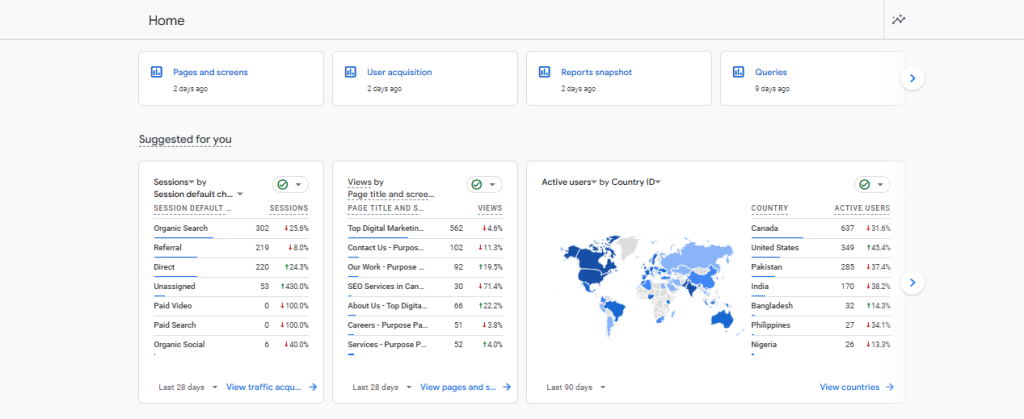
Every time a visitor looks at a page on your site, Google Analytics logs that view. If a person goes to a website, leaves, and then returns to the same page within a few minutes, this is considered two views.
3. Sessions:
A session is another way of saying that a user is visiting your website instead of just viewing it. Your site can support many sessions for a single user. There are many things a user can do while in a session. For example, when you see a website, save a file, play a video, click a link, or fill out a form, Google Analytics assigns a distinct session identifier to each interaction to understand which interactions occur in a session. When a user exits the site or is inactive for 30 minutes, Google Analytics considers the session to have ended.
Have a look at the views, sessions, and active users taken from Google Analytics.
4. Events:
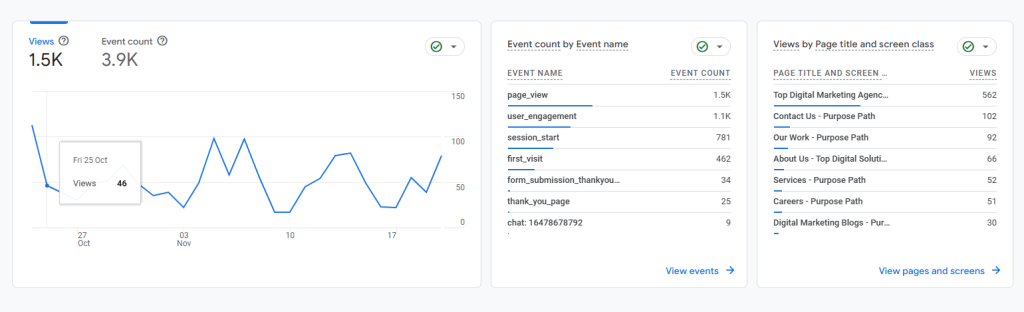
A user can engage with your site in several ways throughout a session. They could watch a video, read some text, click on a link, or fill out a form. Such actions are known as events.
View the events taking place in the image below from GA4.
5. Conversions:
Conversions are the most critical part of your website. You must first choose which occurrences are considered conversions to keep track of them. Conversions can be easily created in Google Analytics by utilizing pre-existing events. You can create event data by performing the desired action yourself.
To create the event, follow the steps below;
- Click ‘Admin’ on the left side of your Google Analytics interface
- Select ‘Events’ within the Property settings.
- Find the “File_downlodad’ Event and mark it as conversion.
Google Analytics Dashboard:
Real-Time Reporting:
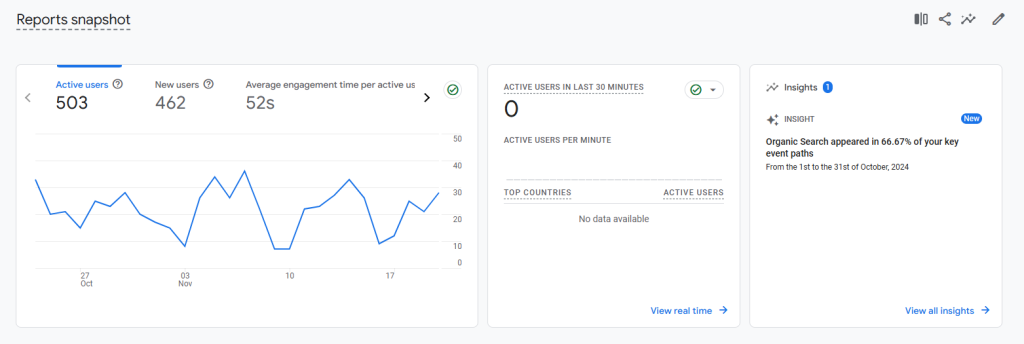
The real-time report shows the number of people who view your website and how visitors interact with it. The main card displays the number of visitors to your site in the past 30 minutes and the percentage of those who used desktop, mobile, or other devices.
User Acquisition:
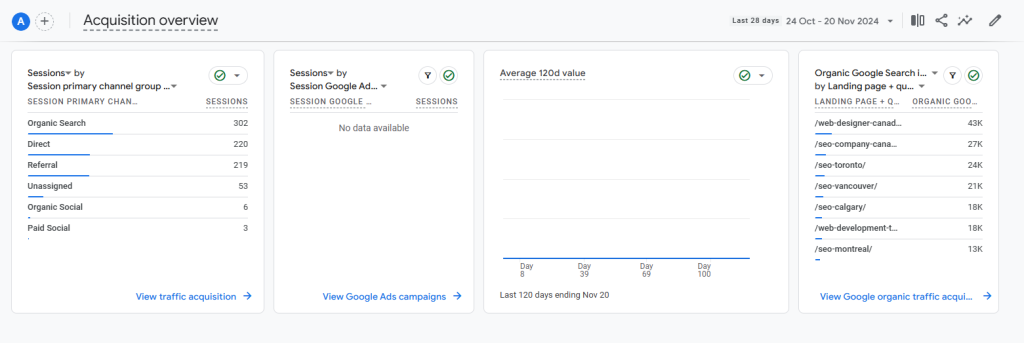
Google Analytics provides extensive details about your website visitors in the Acquisition report. This is the report to consult if you want to learn more about your traffic sources. To know how people found your website, you should first look into the Traffic Acquisition report.
Engagement:
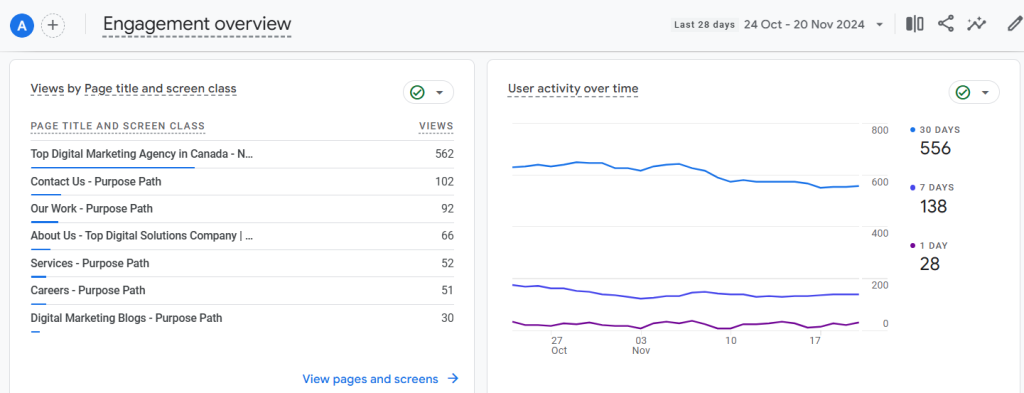
Examining the Engagement report in Google Analytics is the best way to learn about your website visitors’ actions while on your site. Here, you can view the pages visitors viewed, the pages they visited, and the conversions they performed.
Monetization:
The monetization report can benefit websites that offer digital or other services. You’ll need to install an eCommerce tracking system to monitor the money coming in from your website, which is an online store.
Search Console:
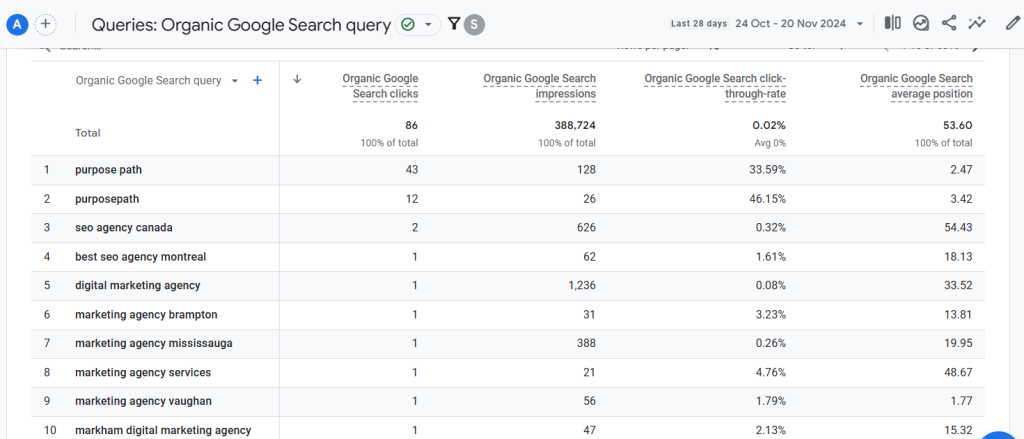
The search console feature allows you to learn about the queries made regarding your business.
User Attributes:
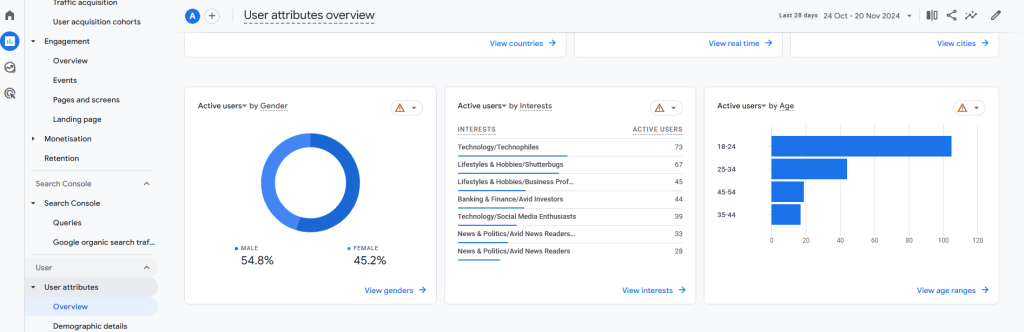
The demographics report may reveal more about your target audience’s gender, age, location, and language. This information can help you identify your target demographic and create content that relates to them.
Tech:
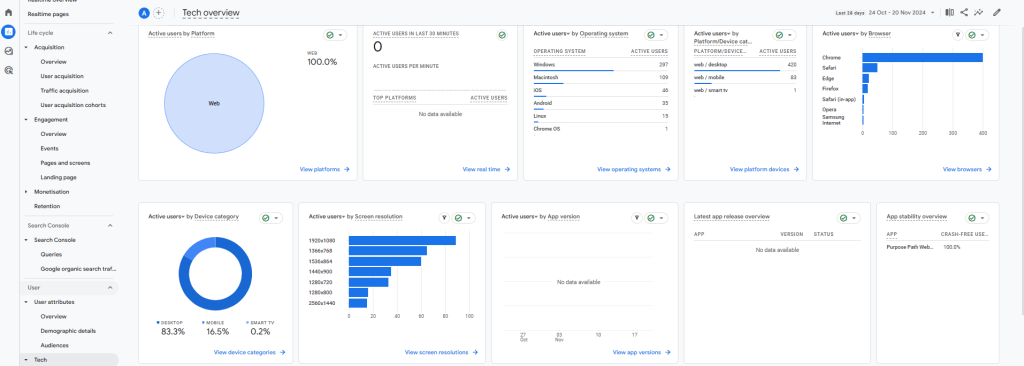
The tech report details the devices, operating systems, and browsers that accessed your site. You can find out what operating systems and browsers they use.
Get More Insights on What’s Trending and What’s Not- Keep Following Purpose Path
Google Analytics should be used with every website. Nothing beats this free tool for gathering useful information on your site’s crucial information. While there are a lot of technical features in Google Analytics, new users can get by with only a few simple reports mentioned in this blog post. Those are the only reports you genuinely require. Remember that Google Analytics can also be installed with ease. Depending on your expertise, you can enroll in Google Analytics courses to learn about this tool’s features.
Follow Purpose Path to learn more about trending tools and topics. Our expert guides and insights allow you to stay one step ahead of your online competition and maximize your brand’s ability in the digital world.
The best part? Purpose Path, a full-service digital marketing firm based in Canada, offers a complete range of digital marketing services, including SEO, SMM, Web Development, Advertising, Podcasting, E-Commerce Solutions, and more. With years of experience in the field, Purpose Path uses the best analytics tools, including Google Analytics and Semrush, to track your company’s progress in the digital world and provide real-time results and recommendations. Curious to learn more? Visit our website right away.
Frequently Asked Questions:
- Can I learn to use Google Analytics myself?
It usually takes a lot of work to acquire all the details about Google Analytics. To ease the process, you may join the Google Analytics Certificate courses and learn everything about how to operate the tool.
- Is Google Analytics free to use?
Yes, Google Analytics is generally accessible. With it, you can learn about the customer journey and increase your marketing efforts’ return on investment (ROI) without spending anything.
- What is Google Analytics mainly used for?
Google Analytics analyzes your company’s online presence by gathering data from your apps and websites.


